Best Parrot alternative: learn from videos you choose
You watch Spanish every day. You still freeze when it's your turn. Spark turns the videos you choose into words you use.
The verdict in 30 secondsUpdated
The best Parrot alternative for learning from YouTube videos you choose is Spark.
Parrot picks short native-speaker clips for you, while Spark lets you import any YouTube video you choose, tap the words you do not know, and turn them into speaking practice the same day.
- Choose your own content: Parrot shows you a feed of short clips. Spark imports any YouTube video, article, or book you choose.
- Use the words you meet: Parrot saves words for spaced-repetition review. Spark tracks words as new, unknown, or known, and known words are counted as passive or active, so you can see which words you can actually use.NewUnknownKnown
- Talk about what you watched: Parrot's speaking step is repeat-back, 80 percent input and 20 percent output on its own site. Spark lets you type or speak about the video you just watched, and Spark replies in text for now.
Choose Spark if
 Choose Spark if
- You watch Spanish daily but say little, and you want to use the words from the videos you already watch.
- You want to choose your own YouTube videos, articles, and books, not a feed picked for you.
- You want to see which words you can actually use, not just which words you saved.
Choose Parrot if
- You want short, native-speaker clips in a scrollable feed, in Spanish only, for a few minutes a day.
- You are happy with repeat-back speaking practice and saved-word review, and you do not need to talk about a full video or article.
- You want an iPhone or Android app first, and you are starting Spanish from day one.
Learn Spanish from YouTube videos you choose
Parrot and Spark are not doing the same job. Parrot is a feed for input. Spark is a loop that turns input into use. Parrot picks short clips for you and helps you understand them. Spark lets you bring the video you choose, learn the words in it, and then use those words in a conversation the same day.
Where Parrot wins
- The short-clip feed.Parrot picks every short clip at your level, so you open the app and watch, with nothing to set up.
- Real Spanish voices.Its clips come from native speakers from Mexico, Spain, Argentina, Colombia and beyond.
- Made for spare minutes.Apps for iPhone, iPad, Mac and Android, built for a few minutes a day.
Parrot is the TikTok-style feed. Spark is what happens after the scroll stops.
Where Parrot stops
Parrot stops at understanding. It does not let you bring a full YouTube video or book you choose, it does not track which words you can actually use, and it does not let you talk about what you watched. That is the gap Spark is built for.
How Spark works
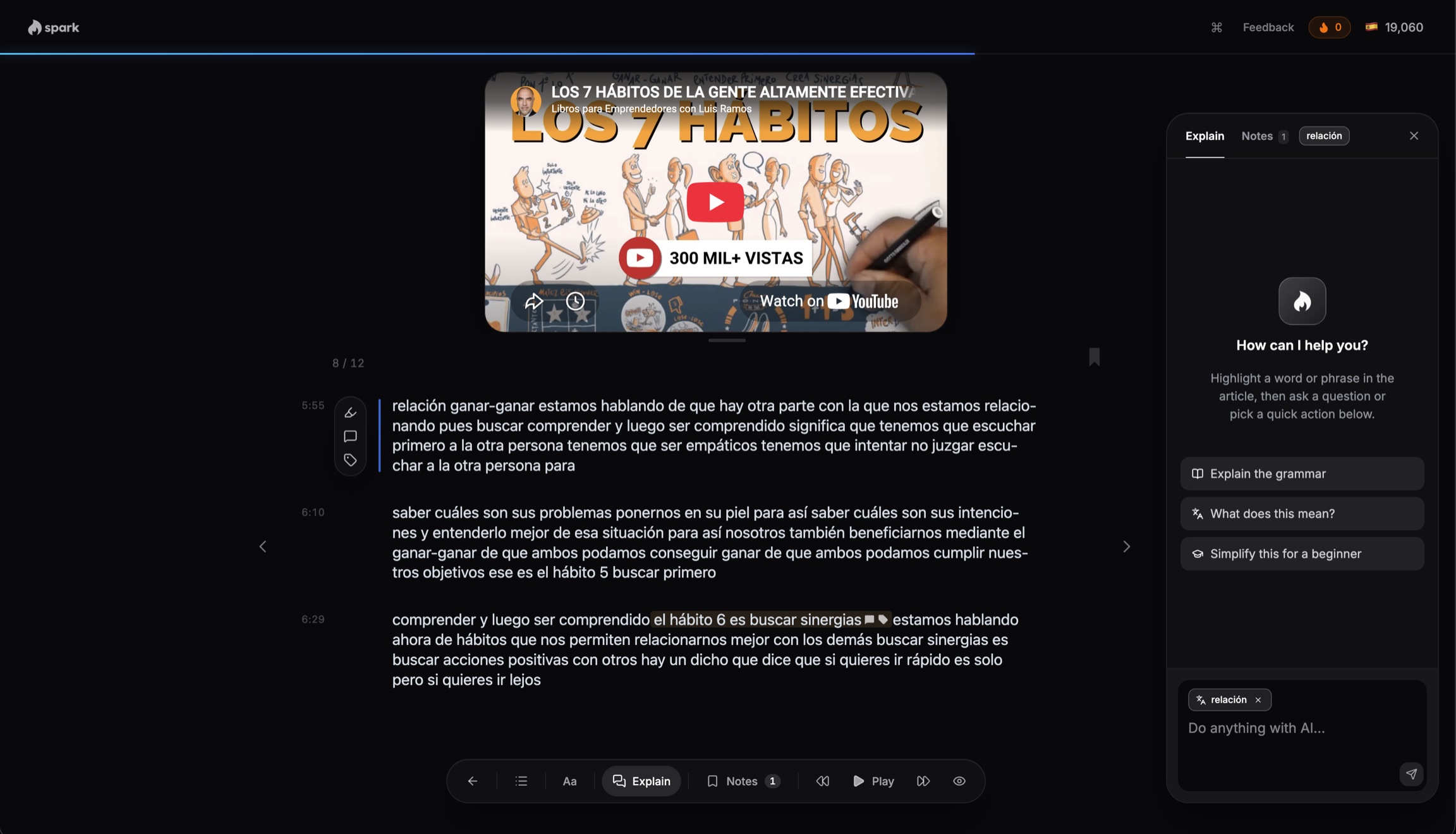
1. Immerse
Read what you love.
Import any YouTube video, article, or book you choose, and tap any word you do not know.
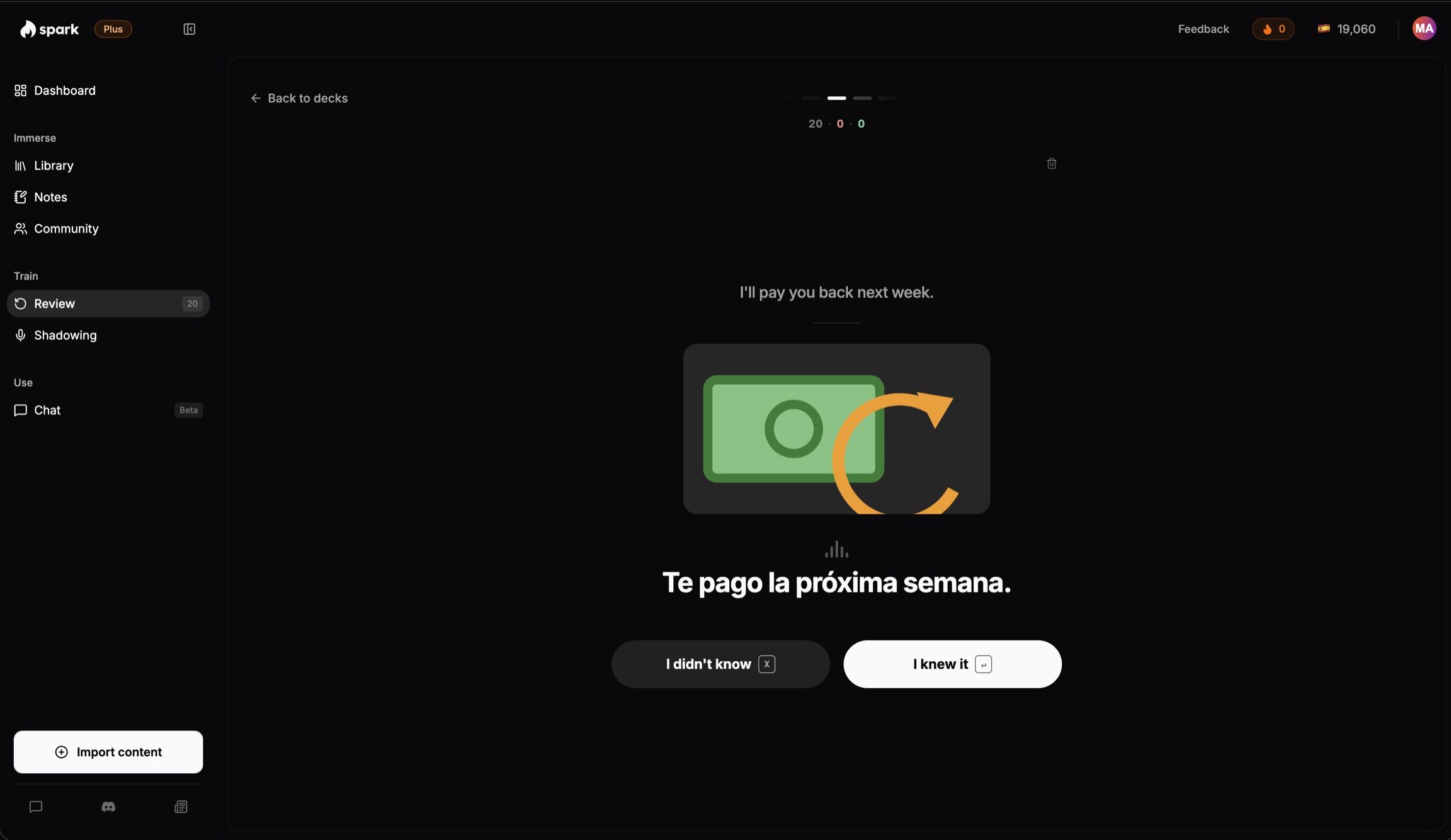
2. Train
Don't re-read it. Recall it.
Review the words you just met, in the sentences you met them, until they stick. Then shadow them: repeat after the model voice to practice saying them. No score, no grading.
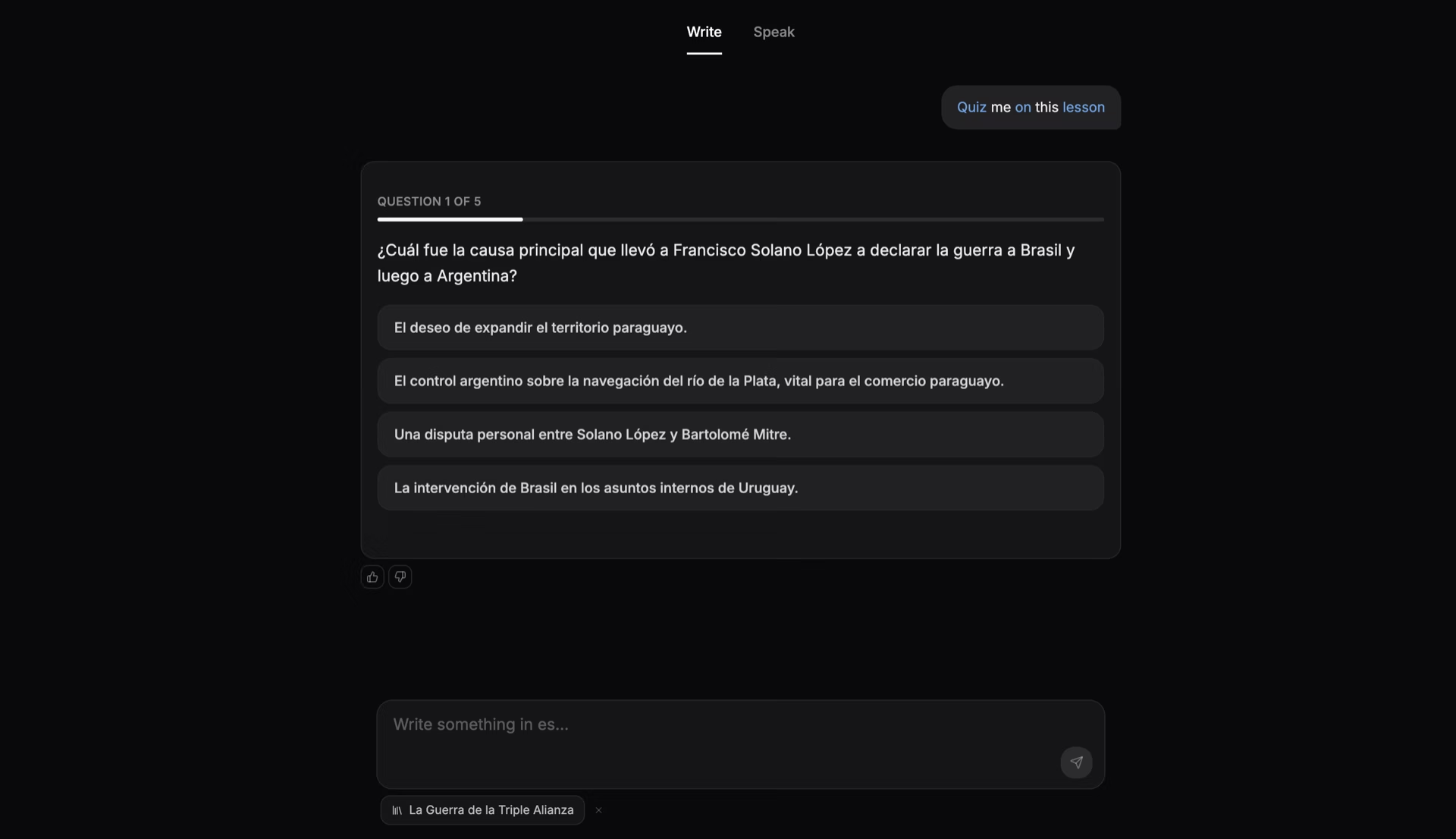
3. Use
Say it back. Tonight.
Type or speak about the video you just watched, with the words you just met. Spark replies in text for now. Or hold a live conversation in the Speak tab, with tappable captions.
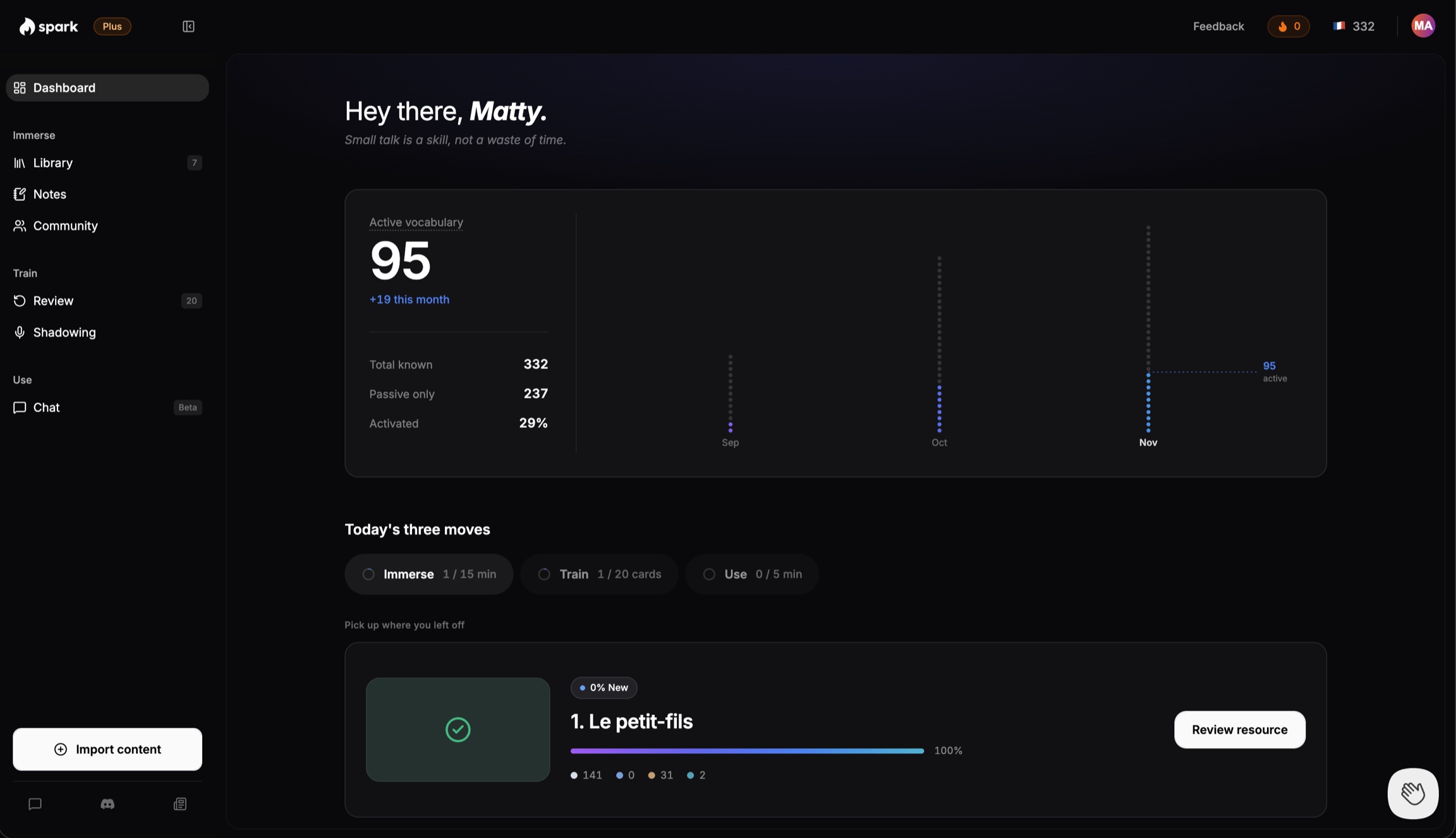
Watch your usable words grow
Your dashboard shows how many words you can use, how that changed this month, and today's three steps.
Active vocabulary 95, up 19 this month. That is 19 words that moved from understood to usable, not just saved.
How we compared
Matt, Spark's founder, learned Spanish because he liked the music, and kept going because a friend in Costa Rica invited him to live there.
For this page we read Parrot's own website, its US App Store listing and its Chrome extension listing on November 12, 2026, and set them against what Spark does today. We count a word as usable only when Spark marks it active, not when it is saved.
No quote on this page is invented. When a Parrot switcher tells us their story, we will add it here, with their name.
Spark and Parrot, side by side
| Feature | Spark | Parrot |
|---|---|---|
| Choose your own content, YouTube videos you choose | Yes: Any YouTube video, article, or book you choose | No. A feed of short clips picked for you1 |
| Languages | 17 languages | Spanish only |
| Speaking practice, Chat | Type or speak about what you watched. Spark replies in text for now. | Repeat lines aloud, with pronunciation feedback |
| Pronunciation practice, Shadowing | Shadowing on the words you are learning. Repeat after the model. No score. | Repeat lines aloud, with instant pronunciation feedback |
| Live conversation, Speak tab | Yes: Live conversation in your target language, with tappable captions | No live conversation. Repeat-back only. |
| Word tracking | New, unknown, or known as you read. Known split passive or active.NewUnknownKnown | Words marked learning or known |
| AI chat partner | Yes. Chat about what you just read or watched; it corrects you as you go. | No |
| Price, as of November 12, 2026 | Free plan: Yes. Core $14.99 per month. 7-day Core trial, no card. | Free plan: No. From $9.99 per month.2 |
- 1Parrot has a Chrome extension, Parrot: Learn Spanish on Any Website, by Parrot Learning Inc. It colors Spanish words on Spanish websites you open, and lets you click a word to translate it to English and save it. It works on Spanish websites only: it does not import YouTube videos, does not work on English articles, and does not chat about what you read.
- 2Parrot's monthly plan is listed at $9.99 to $19.99 (US App Store, November 2026). Annual plans from $44.99 a year. Weekly plans from $5.99 a week.
Who should pick which
Pick Spark if
- You watch Spanish daily but say little
- You want Spanish and another language, not Spanish only
- You want long videos, articles and books
- You want a chat that corrects you
Pick Parrot if
- You are starting Spanish from day one
- You want short clips found for you
- You want to repeat lines aloud
- You want an iPhone or Android app
Also compare Duolingo, Dreaming Spanish and LingQ.
Switching from Parrot
Your time in Parrot still counts.
- 1
Bring the video you watched today. Save it with the Chrome extension, in one click.
- 2
Tap only the words you do not know. The rest count as known when you move on.
- 3
Chat about it tonight. Type or speak, Spark replies in text for now, and Spark tracks which words you used.
What transfers
- Your Spanish. The words you already know still count, so you do not start from zero.
- Your habit. A few minutes a day still works. Your dashboard suggests up to three short articles, or you bring your own video.
- Your saved words, as knowledge. Tap only the words you do not know in Spark; the rest are already known.
What does not transfer
- Your Parrot saved-word list does not import. Spark's only vocabulary import is from LingQ.
- Your Parrot streak does not transfer.
- Your Parrot feed does not transfer. Spark has no feed: you choose the video.
You can use Parrot and Spark together. Keep Parrot for short clips and saying lines out loud. Use Spark for longer articles and videos, and to chat about them afterward.
Questions people ask
- Parrot vs Spark: which should I pick?
- Pick Spark if you want to choose your own YouTube videos and turn them into speaking practice. Pick Parrot - Learn Spanish if you want short native-speaker clips in a scrollable feed in Spanish only. Parrot's method is 80 percent input and 20 percent output, with repeat-back speaking. In Spark you type or speak; Spark replies in text for now.
- What is the best Parrot alternative for learning Spanish from YouTube videos I choose?
- Spark is the best Parrot alternative for learning Spanish from YouTube videos you choose. Parrot shows you short clips picked for you. Spark imports any YouTube video you choose, lets you tap any word you do not know, drills it with shadowing, and lets you talk about the video the same day. Spark replies in text for now.
- I watch Spanish videos every day but still can't speak. What app should I use?
- Use Spark. In Spark you chat about the video you just watched, typing or speaking your replies, and Spark tracks which words you can use, not only recognize. Parrot shows you short clips and repeat-back practice, but it does not turn the video into a conversation about what you watched. Spark replies in text for now.
- Is Parrot worth it?
- Parrot is worth it as a supplement for short native-speaker videos in a scrollable feed, in Spanish only. Parrot is rated 4.7 out of 5 from 18,697 ratings, as of November 12, 2026, and claims over 768,863 learners. Its speaking step is repeat-back, so to choose your own videos and talk about them, use Spark.
- Is Parrot free?
- Parrot is free to download, with a free trial, but full access requires a Parrot+ subscription, as of November 12, 2026. Parrot has no free plan. Spark has a free plan, after a 7-day Core trial with no card required, with 2 article and 2 video imports a month.
- How much does Parrot cost?
- As of November 12, 2026, the US App Store lists Parrot+ from $9.99 a month, with a 7-day free trial on monthly plans, and from $44.99 a year. Other tiers: $14.99 and $19.99 a month, $89.99 a year, $5.99 or $8.99 a week. Spark Core is $14.99 a month or $149 a year, with a 7-day trial and no card.
- Does Parrot have speaking practice?
- Yes. Parrot's speaking practice is repeat-back, with instant pronunciation feedback. Spark is different: Chat lets you type or speak about what you watched, and Shadowing has you repeat new words after a model voice to practice saying them, no score. Live, in the Speak tab, is a live conversation with tappable captions. Spark replies in text for now in Chat.
- Is there an app like Parrot but where I can use my own videos and actually talk about them?
- Yes. Spark is an app like Parrot, Parrot - Learn Spanish, but you use your own videos. Import any YouTube video into Spark, tap the words you do not know, drill them with shadowing, then type or speak about the video out loud. Spark replies in text for now.
More questions
- Parrot vs Duolingo: which is better?
- Neither; they teach in different ways. Duolingo is a course of short lessons in 40+ languages. Parrot teaches Spanish through short clips by native speakers. Pick Parrot to hear real speech, Duolingo for a set path. Our Duolingo comparison.
- Does Parrot work for beginners?
- Yes. Parrot's FAQ says its Flight School is built for day one, and that the feed scales to your level once you are further along.
- Does Parrot have an AI tutor you can chat with?
- Not as a chat. Parrot calls its whole method an AI Spanish tutor: videos at your level plus repeat-out-loud practice. Its AI connector lets ChatGPT and other assistants quiz you on your Parrot words.
- Can I use Parrot and Spark together?
- Yes. Keep Parrot for short clips and saying lines out loud. Use Spark for longer articles and videos, and to chat about them afterward. You type or speak; Spark replies in text for now.
- Is Spark good for beginners?
- Not at first. Spark works best once you can read simple real content. If you are brand new, it starts you on short stories written at your level, but an app built for day one may suit you better.
- Can I use Spark on my phone?
- Yes. The whole app works in your phone's browser, and pages turn with a swipe. Saving web pages and YouTube videos in one click uses the Chrome extension.
Bring the video you watched today
See how much you already know. Import a YouTube video or an article, and every word shows how well you know it.
Try Spark freeFree to start. No card needed.
Sources
- Parrot - Learn Spanish, parrotapp.com, checked November 12, 2026. Method 80 percent input and 20 percent output, Parrot-back speaking practice, free to download with a free trial, over 768,863 learners, 4.7 out of 5 from 18,697 ratings.
- Parrot: Learn Spanish on Any Website, Chrome Web Store, checked November 12, 2026. Developer Parrot Learning Inc., version 1.1.1, updated October 28, 2026. Colors Spanish words on Spanish websites, click to translate and save.
- Parrot: Learn Spanish Language, US App Store, checked November 12, 2026. In-app purchases $5.99 to $8.99 a week, $9.99 to $19.99 a month, $44.99 to $89.99 a year, 7-day free trial on monthly plans.
- Spark pricing, learnwithspark.io, checked November 12, 2026. Free plan after a 7-day Core trial, no card. Core $14.99 a month or $149 a year. Plus $29.99 a month or $299 a year.
Prices and features change. If something here is out of date, tell us at matt@learnwithspark.io and we will fix it.